
WordPress resource
Variation Swatches Pro 2.5.1 Free Download — Stock Tests & Nulled FAQ
A verified free/Pro version pair shows red in stock, blue unavailable and Clear resetting the purchase state. Includes the compatibility problem found with the newest free core.
Variation Swatches Pro v2.5.1 Free Download
Start with the tested version pair
The first important result was a compatibility failure: free Variation Swatches 2.6.0 automatically deactivated the supplied Pro 2.5.1 because of its minimum-Pro compatibility check. We did not patch that check or force the combination. We obtained the published free 2.5.0 release from WordPress.org, installed it with Pro 2.5.1 and reran the stock tests successfully.
The Companion Files download therefore contains the exact tested free 2.5.0 and WooCommerce 11.2.1 dependencies. It is not labelled as the newest free release. A newer Pro version may support newer core versions, but that combination was not available in this package and was not tested. Preserve this dependency context when comparing screenshots or reproducing the result.
A real variable product with two colors
We created a global Workshop color attribute with red and blue terms and saved their native hex-color metadata. The synthetic Workshop notebook variable product had a red variation priced at $20 with three units, and a blue variation priced at $22 with zero units and out-of-stock status. No product photograph was supplied, so WooCommerce’s normal image placeholder is visible; it is not an AI-generated product image.
| Color | Stock | Expected interaction |
|---|---|---|
| Red | 3 in stock | Selectable with a purchase option after selection |
| Blue | 0; out of stock | Unavailable with the configured Pro stock behavior |
| No selection | No variation chosen | Purchase control remains in selection-required state |
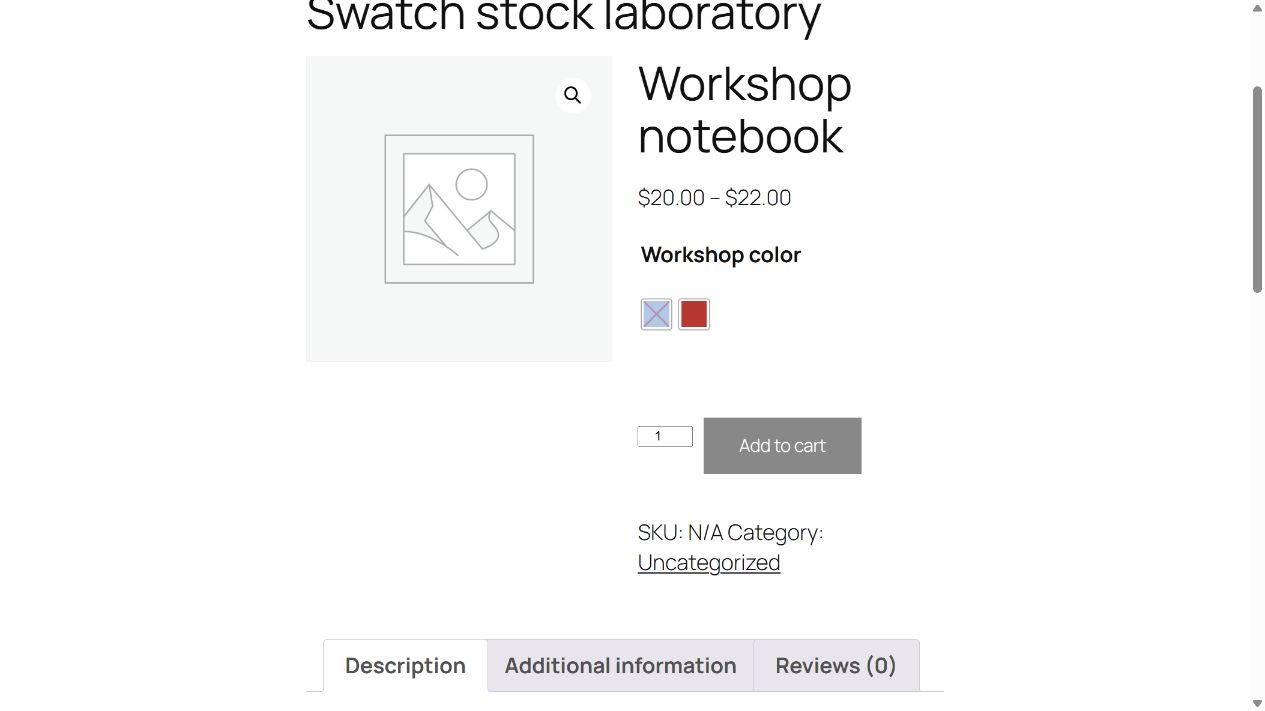
The page used WooCommerce’s classic product-page shortcode under the recorded theme. This avoids assuming that the same result holds for every block-based product template, quick-view extension or custom theme integration.
Red could be selected; blue was unavailable
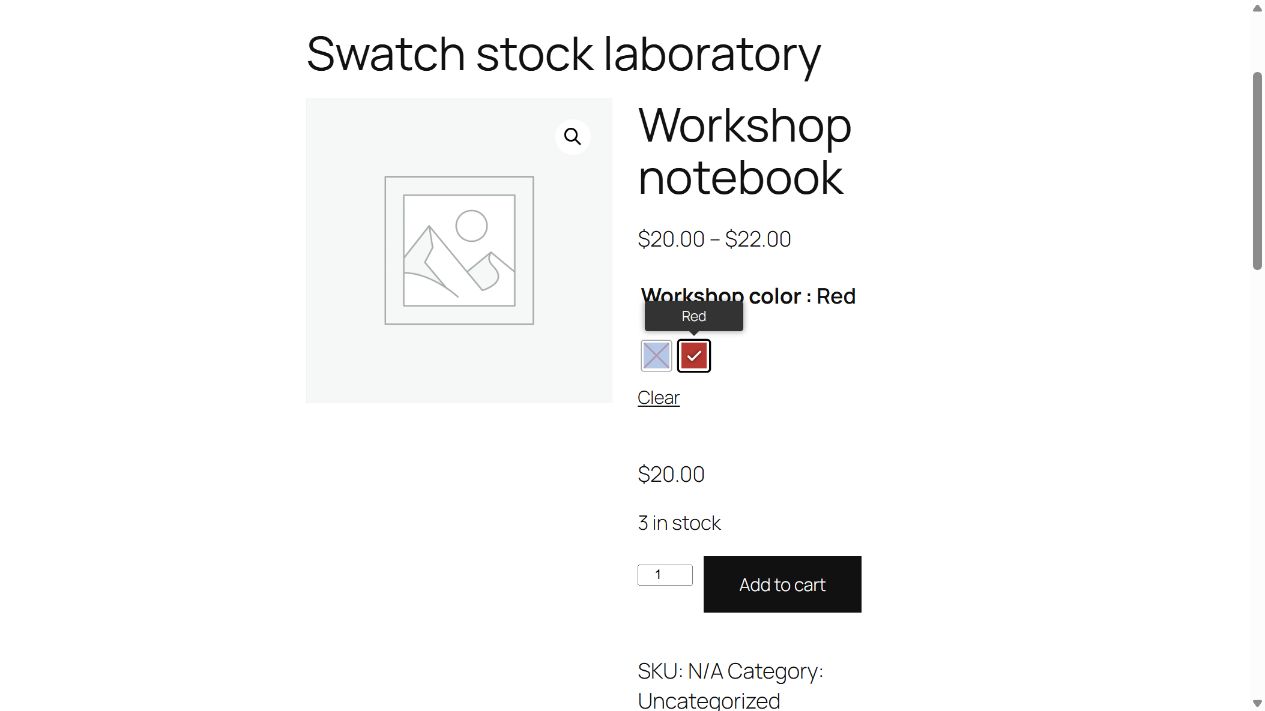
With the native blur/out-of-stock setting enabled, the Pro filter marked the blue variation inactive while leaving red active. The native available-variation data contained the red stock label. In the browser, blue carried the disabled/unavailable state; choosing red displayed “3 in stock” and removed the selection-required disabled class from the Add to cart control.
We deliberately stopped before adding anything to a cart. This is a selection/display test, not an order, payment, overselling or inventory-concurrency test. A browser-disabled option alone is not proof that the server rejects a forged order request; that is a separate WooCommerce validation concern.
Clear and a narrow-screen check
Clicking Clear reset the selected color and the native page announced that options needed to be selected again. Selecting red afterward resolved the same in-stock variation. This checks an ordinary recovery path a shopper may use when comparing colors, rather than only the first successful click.
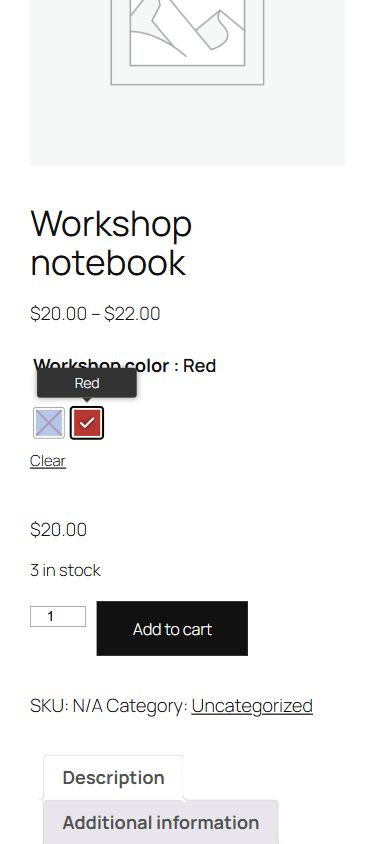
The 390-pixel browser check found no horizontal page overflow. The recorded mobile screenshot and visitor observations belong to this synthetic classic-template page; they are not a guarantee for large variation sets, archive swatches, AJAX-loaded products or a different theme. Repeat the interaction on the actual template that shoppers will use.
Reproduce the version and stock checks
Install WooCommerce, the compatible free core and then Pro in disposable staging. Run the fixture’s attribute setup first, then its product checks in a fresh process so the taxonomy is registered. The resources record the compatible pair and the earlier 2.6.0 incompatibility. Review and adapt the guards before execution; the fixture creates synthetic products and changes swatch settings.
If color dots are unnecessary, WooCommerce’s ordinary variation selector may already meet the requirement. We did not benchmark alternative swatch tools. Our evidence is specific to native color metadata, stock flags, visible selection and reset behavior with the archived versions offered below.
Swatches compatibility and Nulled questions
“Nulled” usually describes software whose activation or licence checks have been removed or altered; the word alone does not determine whether a particular use is lawful. GPL-covered code can be studied, modified and redistributed subject to its licence conditions, but this does not grant access to a developer’s account, hosted services, updates or support. We discuss the term here to answer a common search question; the download details separately identify the package source and tested version. Any plugin or theme obtained through an unverified third party can contain unwanted changes or malicious code, whether or not it is labelled “nulled”. Before installing it, you can ask ChatGPT or Claude Code to inspect the extracted source for suspicious behaviour without executing it or sharing credentials. Treat that review as an additional check: AI can miss harmful code or flag harmless code, and a clean result is not a security guarantee.
Why did Pro deactivate after a free-core update? Free 2.6.0 rejected the supplied Pro 2.5.1 in our test. The verified pairing here uses free 2.5.0; choose documented compatible versions rather than bypassing the check.
Does a disabled blue swatch prove checkout protection? No. We checked frontend selection and native stock flags, without submitting an order or testing hostile requests.
Are paid add-ons included in the companion archive? This product’s companion contains the required free core and WooCommerce, not an invented collection of additional paid add-ons.
Package record
- Package version
- 2.5.1
- Source
- GPLHub
- Source reference
- Source page ↗
- ZIP size
- 124.0 KB (126,956 bytes)
- SHA-256
b52f5497c7c53e85d9b0e2d2adcd93f28c957ae888c1e5d8ef90f8238c9a5e11- Checked
- Modification status
- Not established
- Inspection notes
- GPLHub-sourced package. No trusted same-version vendor ZIP comparison or security audit was performed for this publication. Activation and the bounded functional tests below do not establish vendor byte identity, account entitlement or guaranteed safety.
Companion archive
- Archive
- variation-swatches-pro-companions-20261021.zip
- Archive size
- 17.39 MB (18,237,486 bytes)
- SHA-256
7cd4d4d5986c09292f9819316bf01494651a64870dc79abe334a8da9ba76d15d- Notes
- Dated 21 October 2026 GPLHub companion snapshot, with duplicate and superseded component roots removed. Dependencies and themes are listed separately. Only the combinations expressly tested in the article were exercised; this is not every official add-on ever released. Includes the tested free 2.5.0 dependency, not free 2.6.0, which disabled this Pro 2.5.1 pairing.
| Component | Version | ZIP filename |
|---|---|---|
| Variation Swatches for WooCommerce | 2.5.0 | dependencys/woo-variation-swatches-2.5.0.zip |
| WooCommerce | 11.2.1 | dependencys/woocommerce-11.2.1.zip |
Changelog
Download ZIP files
Free package downloads
The main package and companion files are separate downloads. The companion archive contains only the components listed in this page’s inventory.
Extract the companion archive first. Install only the individual theme or plugin ZIPs you need; do not upload the entire archive as one plugin.
Dated 21 October 2026 GPLHub companion snapshot, with duplicate and superseded component roots removed. Dependencies and themes are listed separately. Only the combinations expressly tested in the article were exercised; this is not every official add-on ever released. Includes the tested free 2.5.0 dependency, not free 2.6.0, which disabled this Pro 2.5.1 pairing.